Debian is better for stability and full control, while Ubuntu is better for beginners who want an easy setup and fresher software.
Ubuntu is built on top of Debian, so the two systems share the same roots and many of the same tools. Debian is a community-run project that started in 1993, while Ubuntu is developed by the company Canonical and first appeared in 2004. This shared base is why they feel similar but work differently.
Debian is known for its stable releases, which are carefully tested and change slowly. For example, many server admins choose it because it rarely breaks after an update. Ubuntu, on the other hand, releases new versions regularly and offers long-term support (LTS) editions that are popular on desktops and cloud servers.
The best choice depends on how you plan to use it. Beginners often prefer Ubuntu because of its friendly installer, wide hardware support, and large help community. Experienced users may pick Debian for its simplicity, its focus on free software, and its minimal approach.
Software, updates, and support also differ between the two. Ubuntu usually ships newer packages and includes Snap, while Debian puts more weight on reliability over the latest features. As a result, neither one is better for everyone.
In this guide, you will learn the key differences between Debian and Ubuntu, from stability and software to performance and ease of use. You will also find real examples, a quick comparison, and answers to frequently asked questions to help you choose the right Linux system with confidence.
Featured Snippet: Debian vs Ubuntu at a Glance
Debian vs Ubuntu comes down to stability, convenience, and support. Debian is a strong choice for users who prefer a conservative system, careful package selection, and control over their setup. Ubuntu is often better for beginners who want a convenient desktop, predictable releases, broad hardware support, and optional commercial support. Both are capable Linux operating systems.
Debian vs Ubuntu: Quick Answer
Choose Debian if you want a conservative Linux system, a minimal installation, and greater freedom to shape your environment.
Choose Ubuntu if you want a beginner-friendly desktop, a predictable release schedule, and convenient options for development and business use.
Here are three common examples:
- For a beginner’s laptop: Ubuntu is often the easier starting point because its desktop installation provides a ready-to-use environment.
- For a stable home server: Debian Stable is a strong option when you want a conservative software base.
- For a business cloud server: Ubuntu LTS may suit teams that value a defined support lifecycle and optional enterprise services.
Neither distribution wins every category. Hardware compatibility, workload, software requirements, and administration skills can matter more than the name of the operating system.
What Does Debian vs Ubuntu Mean?
Debian and Ubuntu are Linux distributions. A Linux distribution combines the Linux kernel with system tools, software packages, installation methods, and other components to create a usable operating system.
What is Debian?
Debian
Debian is a community-driven, open-source operating system known for its careful release process and broad software collection. Its Stable branch prioritizes tested packages and predictable behavior. Users can choose different desktop environments or install only the components they need.
Debian is suitable for desktops, servers, development environments, and lightweight installations. It gives experienced users flexibility, although some packages in Stable may be older than those in faster-moving distributions.
What is Ubuntu?
Ubuntu
Ubuntu is an open-source Linux distribution developed from Debian’s software foundation. It is led by Canonical and supported by a large community. Its desktop edition emphasizes ease of use, while its server editions target web hosting, cloud computing, and enterprise workloads.
Ubuntu includes its own release process, package choices, default settings, and support options. Its Long Term Support (LTS) releases are especially useful for people who want a defined maintenance period.
The key relationship
Ubuntu is based on Debian, but the two are separate distributions. They share many technologies, including the APT package-management system and the .deb software package format. However, their repositories, release policies, and system defaults differ. A package made for one distribution should not automatically be assumed to work safely on the other.
The Origin of Debian and Ubuntu
Debian was founded in 1993 by Ian Murdock. It grew into a major community-led project built around free software, open development, and a structured release process.
Ubuntu first appeared in 2004. It used Debian as its foundation and aimed to make Linux more accessible while maintaining regular releases and a consistent user experience.
Over time, the projects developed different priorities. Debian continued to emphasize community governance, software freedom, and carefully tested Stable releases. Ubuntu introduced a more time-based release schedule, desktop-focused defaults, and commercial support options.
These differences are not a simple story of one system being old and the other being modern. Both projects continue to evolve. The practical distinction lies in how each project selects, tests, packages, releases, and supports software.
Debian vs Ubuntu: British English vs American English
This section of the original comparison template does not apply to this keyword. Debian and Ubuntu are software names, not alternative British and American spellings.
Instead, the useful comparison is between their technical features.
| Feature | Debian | Ubuntu |
| Foundation | Independent community distribution | Based on Debian |
| Main priority | Conservative, tested software | Convenience and scheduled releases |
| Release approach | Stable, Testing, and Unstable branches | Regular releases every six months |
| Long-term support | Debian Stable has its own support lifecycle | LTS releases every two years |
| Default desktop | Depends on installation choices | GNOME-based desktop by default |
| Package management | APT and .deb packages | APT, .deb packages, and Snap support |
| Commercial support | Primarily community-based, with third-party options | Optional Canonical support services |
| Customization | Extensive | Extensive |
| Best starting point | Users who value control and a conservative base | Users who value convenience and guided setup |
The most important point is that these differences describe typical defaults. Both distributions can be customized, and actual results depend on the release, installed software, and configuration.
Which Version Should You Use?
The best choice depends on what you plan to do with Linux. Consider the following recommendations before installing either distribution.
- United States: Ubuntu is a practical choice for new users, developers, and organizations that want a familiar desktop and optional commercial support. Debian is equally worth considering for users who prefer community-led software.
- United Kingdom: Either distribution works well for personal computers, web hosting, and development. Choose based on your hardware and support requirements rather than your location.
- Canada: Ubuntu can be a convenient option for students and home users. Debian may suit experienced users who want a minimal system.
- Australia: Both work well for desktops and servers. Check hardware compatibility and the availability of support in your preferred time zone if you manage business-critical systems.
- International writing and general use: There is no regional rule that favors one distribution. Choose based on technical needs.
- Academic writing and research: Debian is useful for controlled environments that benefit from consistent software. Ubuntu is also suitable, particularly when course instructions or research tools target a specific Ubuntu release.
- Business writing and enterprise IT: Ubuntu LTS can be attractive when a team needs defined support options. Debian can also serve production workloads when the organization has the skills and processes to maintain it.
Choose based on your main goal
| Your goal | Recommended starting point | Why |
| First Linux installation | Ubuntu | Convenient default desktop |
| Minimal server | Debian Stable | Conservative base and flexible installation |
| Web development | Either | Both support common development tools |
| Cloud deployment | Ubuntu LTS or Debian Stable | Depends on provider images and workload |
| Learning Linux administration | Either | Both teach transferable Linux skills |
| Older computer | Either, with a lightweight desktop | Actual performance depends on hardware and setup |
| Enterprise support | Ubuntu LTS is worth evaluating | Optional commercial support |
| Maximum control over installation | Debian | Flexible installation choices |
These are starting points, not strict rules. A well-configured Debian desktop can be beginner-friendly, and an experienced administrator can use Ubuntu with very little unnecessary software.
Common Mistakes When Comparing Debian and Ubuntu
People often choose a distribution based on assumptions instead of testing their real requirements. Avoid these common mistakes.
Mistake 1: Assuming Debian is always faster
Incorrect assumption: Debian always uses fewer resources than Ubuntu.
Correct understanding: A minimal Debian installation can use fewer resources than a typical desktop installation of Ubuntu. However, desktop environment, background services, drivers, and applications affect performance.
Memory tip: Compare actual installations, not just distribution names.
Mistake 2: Assuming Ubuntu is always less stable
Incorrect assumption: Ubuntu is only for new users and is unsuitable for servers.
Correct understanding: Ubuntu LTS is designed for long-term use and is widely used in server and cloud environments. Debian Stable is also a strong server choice. Reliability depends on maintenance, configuration, and workload.
Memory tip: A scheduled release does not automatically mean an unstable system.
Mistake 3: Mixing packages from both distributions
Incorrect approach: Adding repositories from the other distribution to install a missing package.
Correct approach: Prefer packages built for your installed distribution and release. Use a supported alternative, a compatible container, or a carefully managed build when needed.
Why it matters: Shared package formats do not guarantee matching dependencies or compatible system libraries.
Memory tip: Share knowledge between distributions, not their system repositories.
Mistake 4: Ignoring support dates
Incorrect assumption: An installed operating system remains fully supported forever.
Correct approach: Check the support period for your exact release and the software packages you use. Plan upgrades before security maintenance ends.
Memory tip: Always know your release and its end-of-support date.
Mistake 5: Choosing based only on popularity
Incorrect assumption: The more popular distribution is always the better one.
Correct understanding: Popularity can affect tutorials and community resources, but it does not decide if a distribution meets your needs.
Memory tip: Match the operating system to the task.
Everyday Examples: Debian vs Ubuntu in Real Use
The following examples show how the choice can affect common tasks.
1. Email and everyday desktop use
A student needs a browser, office software, video calls, and email.
Ubuntu is often a convenient choice because its default desktop provides a ready-to-use environment. Debian can do the same, but the selected installer options and desktop environment may require more setup.
2. Business writing and office work
A small company needs office applications, shared files, and a stable workstation.
Both distributions can handle this workload. The company should also consider application compatibility, device management, security updates, and the time required to maintain each computer.
3. News websites and web hosting
A publisher wants to host a website, a database, and a caching service.
Debian Stable is a reasonable choice for a conservative server environment. Ubuntu LTS is another strong option, particularly when the publisher relies on provider-specific images, commercial support, or a standardized cloud setup.
4. Blogs and content management systems
A blogger wants to run a content management system such as WordPress.
Both distributions can run the required web server, database, and scripting tools. The deciding factors are usually hosting support, application requirements, update policies, and administrator experience.
5. Social media and development communities
A developer follows tutorials to install programming tools.
Ubuntu-specific instructions may be easier to follow in projects that target Ubuntu. Many commands also work on Debian, but package names, available versions, and installation steps can differ.
6. Academic projects
A researcher needs a repeatable environment for a software experiment.
Either distribution can work. Debian Stable may help when a conservative software base is useful, while Ubuntu may be preferable if a lab tool or vendor provides explicit support for an Ubuntu release.
7. Daily terminal commands
A user learns how to install software and update a system.
Both distributions support familiar APT commands, such as:
update sudo apt
sudo apt upgrade
sudo apt install curl
The commands are similar, but the packages available in the configured repositories may differ. Always check that instructions match your installed release.
Google Trends and Modern Usage
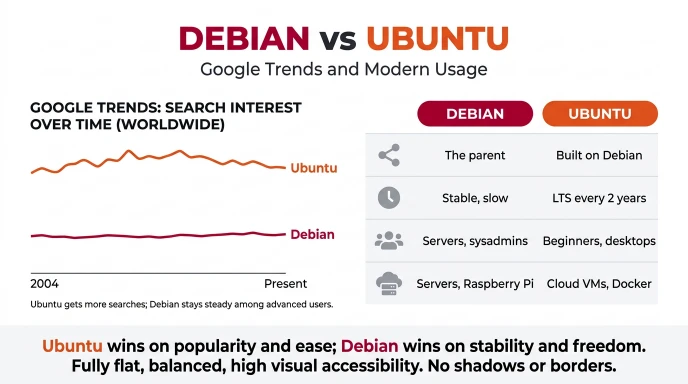
Search interest in “Debian vs Ubuntu” often reflects a practical decision: which operating system should someone install or use for a server?
Common reasons people search for this comparison include:
- Deciding which Linux distribution is easiest for beginners.
- Comparing server stability and security maintenance.
- Looking for lower memory use on older computers.
- Choosing a distribution for cloud hosting or a virtual private server.
- Checking software compatibility and update frequency.
- Understanding the relationship between Debian and Ubuntu.
Which one is more popular?
Popularity varies by audience, environment, and measurement method. Desktop users, server administrators, cloud providers, and developers do not necessarily choose distributions for the same reasons.
Without a verified, date-specific Google Trends comparison, it would be misleading to claim an exact search-volume winner. Search interest also does not directly measure installations, reliability, or user satisfaction.
What matters more than search popularity?
Focus on four practical questions:
- Does your hardware support the distribution and its drivers?
- Does your required software support the release?
- How often can you perform upgrades and maintenance?
- Do you need commercial support or can you manage the system yourself?
These questions are more useful than a general popularity ranking.
Debian vs Ubuntu: Quick Comparison
| Version | Main strength | Correct choice for | Example |
| Debian Stable | Conservative software base | Users who value a tested system | A small business file server |
| Debian minimal installation | Control over installed components | Experienced users and lean deployments | A lightweight virtual machine |
| Ubuntu Desktop | Convenient desktop defaults | Beginners and everyday users | A personal laptop |
| Ubuntu LTS | Defined long-term maintenance options | Organizations and long-running projects | A production cloud server |
| Either distribution | Broad Linux software support | Development and learning | A web development environment |
Neither distribution is universally better. Your software requirements, support expectations, and preferred maintenance process should guide the final choice.
Key Takeaways
- Debian and Ubuntu are related Linux distributions, but they have different release processes and defaults.
- Debian Stable is a good option for users who value a conservative software base.
- Ubuntu often provides a convenient starting point for desktop beginners.
- Both distributions can run web servers, databases, development tools, and desktop applications.
- Ubuntu LTS offers a predictable release schedule and optional commercial support.
- Debian can be customized for minimal systems, desktops, and production servers.
- Do not mix software repositories from different distributions without a well-understood compatibility plan.
- Check support dates, hardware compatibility, and software requirements before installing either one.
FAQs
1. Is Debian better than Ubuntu?
Debian can be better if you want a conservative system and control over your installation. Ubuntu can be better if you prefer a convenient desktop, predictable releases, and optional commercial support. Both are capable operating systems. The better choice depends on your hardware, software requirements, experience, and maintenance needs.
Q1: Why doesn’t Linus Torvalds use Ubuntu or Debian?
Linus Torvalds, the creator of the Linux kernel, has said in interviews that he prefers Fedora. Fedora is widely reported as the distribution he uses. The reasons commonly given are practical: it lets him easily test his own compiled kernels, and it follows a predictable release schedule. He has also said that he appreciates Ubuntu for making Linux familiar to Windows and macOS users, but still prefers Fedora. His choice reflects his kernel-development workflow, not a verdict on Debian or Ubuntu for everyday users.
Q2: Which Linux OS is fastest?
No single Linux distribution is the fastest for everyone, because speed depends on your hardware, desktop environment, and workload. Lightweight systems such as Alpine Linux, Arch Linux, Lubuntu, and Puppy Linux usually feel quick on older computers because they use fewer resources. Heavier desktop setups use more memory and start more slowly. For real speed gains, pick a light desktop such as Xfce or LXQt, and test the system on your own device.
Q3: Which is faster, Ubuntu or Debian?
The difference is small on modern hardware, and it depends mostly on the desktop environment and the software you install. Debian often feels slightly lighter because its default setup is more minimal. Ubuntu may start a little slower on some systems, partly because of extras such as Snap packages, but it also gives you newer software and more guided setup. For daily use, most people will not notice a big speed gap.
Q4: Which is better, Ubuntu or Debian, in 2026?
Neither is better for everyone, so the right choice depends on what you need. Ubuntu is a good fit if you want an easy install, wide hardware support, newer software, and a large help community. Debian is a good fit if you value long-term stability, a minimal system, and a strong focus on free software. Check the current releases and support dates on the official ubuntu.com and debian.org sites before you decide, since versions change.
Q5: What are the 3 most popular Linux distros?
Ubuntu, Linux Mint, and Debian are usually named as the most widely used distributions, especially on desktops and servers. Fedora, Arch Linux, and Pop!_OS also have large communities, and rankings change depending on if you measure downloads, page views, or server use. Because no single chart is final, treat any “top 3” list as a snapshot. Ubuntu stays the best-known choice for beginners, and Debian is the base for many other distributions, including Ubuntu itself.
Conclusion:
The Debian vs Ubuntu comparison is not about finding one Linux distribution that is best for everyone. It is about choosing the right balance of stability, convenience, flexibility, and support for your needs.
Debian is an excellent option for users who want a conservative software base, flexible installation choices, and a community-driven operating system. It is suitable for desktops, development environments, and servers. Its Stable branch is especially useful when predictable system behavior matters.
Ubuntu is often the better starting point for new Linux users. Its desktop defaults make everyday computing convenient, while its LTS releases provide a predictable maintenance schedule. Developers, businesses, and cloud administrators can also benefit from its broad ecosystem and optional commercial support.
Before you decide, check your hardware, required applications, software versions, and maintenance schedule. If possible, test both distributions in a virtual machine or from a live environment before installing one permanently.
The final recommendation is simple: choose Debian for a conservative, flexible setup, or Ubuntu for a convenient starting experience with defined release and support options. Both can provide a powerful, secure Linux environment when properly maintained.
Start with your actual requirements, not popularity alone. The best Linux distribution is the one that fits your work and that you can confidently maintain.
Recommended Reading!

I’m Daniel Carter, a language writer and grammar enthusiast who enjoys making English simple and easy to understand. I write about grammar, spelling, word usage, and common mistakes to help readers use English with more confidence.








2 thoughts on “Debian vs Ubuntu: Which Linux Is Better?”